Introduction
A display can work perfectly in a test room yet become difficult to read after it is installed on a production line, beside a large factory window, or beneath powerful overhead lighting. The problem is not always a defective screen. In many cases, the display has been selected without fully considering the lighting conditions at its actual installation point.
For industrial equipment manufacturers and system integrators, display visibility directly affects how easily operators can read machine status, check process parameters, follow operating instructions, and interact with control software.
Improving visibility requires more than simply increasing screen brightness. The display must be matched to its surroundings, installation position, viewing requirements, and operating conditions.
This guide explains the key factors to consider when selecting and integrating an industrial monitor for brightly lit indoor environments.
1. Identify the Lighting Conditions at the Installation Point
The first step is to evaluate where the monitor will be used and how light reaches its screen.
Two workstations in the same factory may require different display configurations because their physical surroundings are different.
Near Windows and Glass Partitions
Natural daylight can change considerably throughout the day. A monitor positioned near a window may be easy to read in the morning but become difficult to view when sunlight enters the room from a different angle.
The main concern is often a combination of ambient illumination and reflected light. A bright room does not automatically require an extremely bright display, but a screen exposed to strong daylight may need a higher brightness level than one installed in a shaded control cabinet.
Under Strong Industrial Lighting
Production areas, inspection stations, and assembly lines may use powerful overhead LED fixtures or concentrated task lighting. When these light sources reflect off the display surface, they can obscure text, icons, and other interface elements.
In this situation, both display brightness and the direction of reflected light should be considered.
In Mixed-Lighting Environments
Some industrial workspaces combine daylight with artificial lighting. Their illumination levels may change as production shifts, lighting systems, or surrounding equipment change.
For these installations, a display with adjustable brightness can provide greater flexibility than a monitor that operates at one fixed setting.
Before choosing a monitor, observe the actual installation location during representative operating conditions. Note the strongest light sources, the operator's normal viewing position, and any periods when screen readability deteriorates.
2. Select a Brightness Level That Matches the Environment
Display luminance is commonly specified in nits, equivalent to candelas per square metre (cd/m²). It describes how much light the display emits toward the viewer.
A higher luminance level can help screen content remain visible in strong ambient light. However, the number alone does not determine the quality of the viewing experience.
Reflections from the screen surface, the contrast of the displayed content, viewing angle, cover glass, and touchscreen construction can all influence the result.
For example, increasing backlight output may improve visibility when ambient light overwhelms the image. However, it may not fully resolve a strong reflection of a window or ceiling fixture.
When evaluating a monitor, consider these questions:
1. How bright is the environment directly around the display?
2. Does the screen face a window or a concentrated light source?
3. Is the interface mainly text and numerical data, or does it contain detailed graphics?
4. Will operators view the screen from one fixed position or from different angles?
5. Is the brightness rating specified for the LCD panel itself or for the complete monitor?
Practical recommendation: Select a brightness level based on the actual viewing conditions rather than choosing the highest available specification by default. Confirm the result through an installation test before finalizing the equipment design.
3. Manage Reflections Before Increasing Brightness Further
A screen may appear washed out even when its backlight is reasonably bright. This often happens when reflected light reduces the visual separation between displayed content and the background.
The following measures can help address the problem.
Adjust the Monitor Position
Where the equipment design permits, position the display to minimize direct reflections from windows and overhead fixtures. A small change in mounting angle may make a noticeable difference to readability.
The screen should also remain comfortably visible from the operator's normal working position.
Evaluate the Screen Surface
Anti-glare treatments can diffuse reflected light and reduce sharp reflections. However, different surface treatments can affect image appearance differently, so they should be evaluated alongside the display's brightness and contrast characteristics.
For touchscreen products, the complete optical stack matters. The cover lens, touch sensor, surface treatment, and any air gaps between layers can influence the final viewing result.
Review the Interface Design
The content shown on the screen also affects readability. Small fonts, low-contrast colour combinations, crowded layouts, and thin graphical elements can become difficult to distinguish in bright environments.
For HMI applications, use legible text, clear status indicators, sufficient contrast, and a layout that prioritizes essential operating information.
These software and installation improvements can complement a high-brightness monitor and may reduce the need for excessive backlight output.
4. Use Automatic and Manual Brightness Control Effectively
Industrial equipment does not always operate under identical lighting conditions. A monitor beside a window may experience changing daylight, while a machine installed beneath fixed industrial lighting may face relatively consistent illumination.
Brightness control allows the display to respond to these differences.
Automatic Light-Sensing Adjustment
An ambient light sensor detects changes in surrounding illumination and can be used to adjust screen brightness accordingly.
This function is useful when a display is exposed to changing daylight or other variable lighting conditions. It can help maintain a more appropriate brightness setting without requiring operators to make frequent manual adjustments.
The actual response depends on the sensor, control implementation, adjustment range, and configuration of the selected monitor.
Manual Brightness Adjustment
Manual control gives operators or maintenance personnel direct control over the screen's brightness. It is useful when lighting conditions remain stable or when a specific setting is preferred for a particular task.
Switching Between Control Modes
For equipment used in different work areas or at different times of day, access to both control methods provides additional flexibility.
When evaluating an industrial monitor, confirm how the brightness adjustment works, whether automatic and manual modes are available, and how users switch between them.
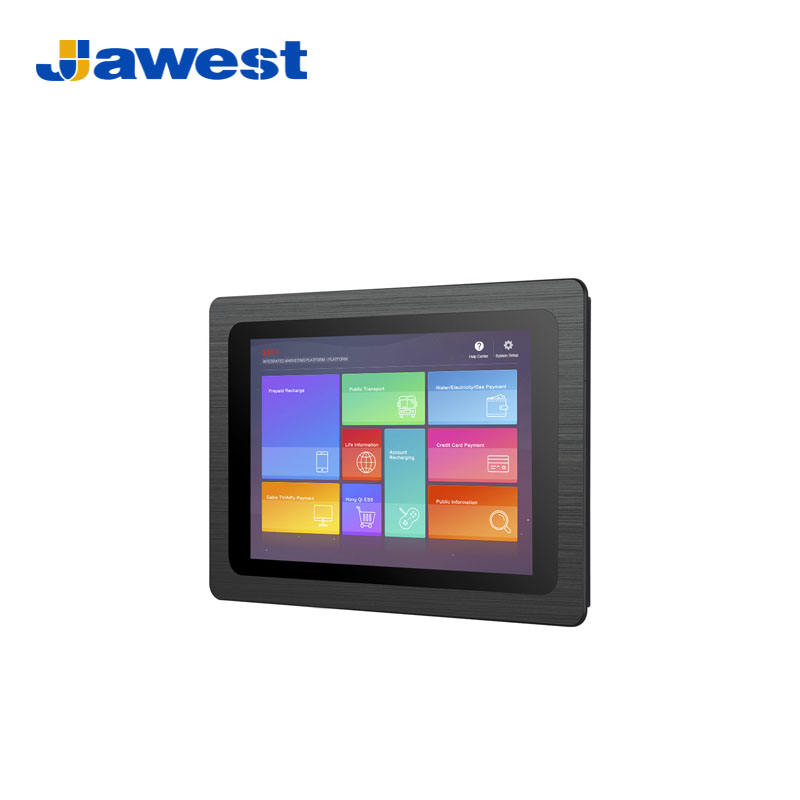
Jawest Indoor High Brightness Industrial Monitors offer manual brightness adjustment and automatic light-sensing control, with a rocker switch on the upper bezel for switching between the two modes, depending on the selected configuration.
5. Consider Temperature Stability in Industrial Environments
Lighting is only one part of the installation environment. The temperature around a monitor can also influence display performance.
Industrial equipment may be installed near heat-generating machinery, inside partially enclosed structures, or in workspaces where heating and cooling conditions vary. A display selected only for its brightness may not be appropriate if its LCD panel is unsuitable for the operating temperature range.
Wide-temperature LCD panels are designed to support operation across a broader specified temperature range than conventional panels. Depending on the panel design and operating conditions, selecting an appropriate panel can help reduce temperature-related display problems.
When comparing monitors, check the rated operating temperature range of the complete product rather than relying solely on the LCD module specification. Enclosure temperature, heat dissipation, mounting conditions, and the monitor's own power consumption may all affect the actual operating conditions.
For projects with significant temperature variation, confirm the required limits with the manufacturer and test the assembled equipment under representative conditions.
6. Check EMC Suitability and Equipment Integration Requirements
Industrial monitors are often installed alongside motor drives, switching power supplies, controllers, communication equipment, and other electronic devices.
Electromagnetic interference can affect electronic systems if the equipment and installation are not designed appropriately. Therefore, EMC suitability should be part of the display selection process, particularly for electrically noisy industrial environments.
7. Choose the Right Screen Size and Touch Configuration
After evaluating lighting and operating conditions, the next step is to select a display format that suits the equipment and the operator's tasks.
A compact monitor may be appropriate for a machine with limited installation space. A larger screen may be preferable when the interface needs to present several process parameters, inspection results, or control panels at the same time.
Jawest Indoor High Brightness Industrial Monitors are available in screen-size options from 10.1 inches to 21.5 inches, subject to model availability.
Build a Better Indoor Display Solution with Jawest
For equipment near windows or bright indoor lighting, Jawest high-nit industrial monitors deliver clear readability and smooth operator interaction.